

Your child just got their first smartphone. They need it for WhatsApp class groups and YouTube studies. But deep down, you are terrified.
You know the internet is full of adult content, gambling ads, and predators. You can’t stand over their shoulder 24/7.
In India, most “Parental Control” apps are expensive subscriptions that cost ₹2,000/year. But do you really need to pay to keep your child safe?
For this CSNR Security Tool review, I tested the best Free options available on the Play Store to see which one actually works without ruining your relationship with your child.
Quick Verdict: The Top 3 Picks
| App Name | Price | Blocking Power | Best For |
| Google Family Link | 100% Free | High | Everyone (Must Have) |
| AirDroid Kids | Freemium | Very High | Real-time Monitoring |
| OpenDNS Family | Free | Network Wide | Home Wi-Fi Protection |
My Opinion: Spying vs. Protecting (The Verdict)
Before you install these, listen to this advice from a security expert.
My Verdict: Do NOT install “Spyware.”
There are apps that let you record your child’s calls, read their WhatsApp messages secretly, and listen to their microphone. Avoid these.
If your child finds out you are reading their private chats (and they will find out), they will never trust you again. They will buy a second “secret phone” that you cannot track.
The Goal: Use these tools to limit time (Digital Wellbeing) and block danger (Adult sites). Do not use them to become a digital jailer. Transparency is your best security tool. Tell them: “I am installing this to keep the bad stuff out, not to spy on your friends.”
1. Google Family Link – The Undisputed King
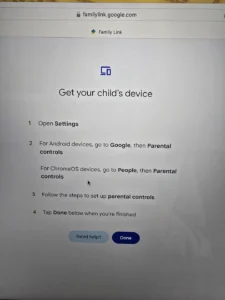
If your child has an Android phone, this is the only app you need. It is built directly into the Google ecosystem.
Key Features:
-
Screen Time Limits: Set a “Bedtime” (e.g., Phone locks at 9 PM).
-
App Approval: If they try to download a game (like BGMI or Free Fire), you get a notification on your phone. You can hit “Deny.”
-
Location Tracking: See exactly where they are on Google Maps.
Why it wins:
It is completely free forever. There are no ads, no “Premium” upgrades. It just works. The integration is seamless—if they search for something inappropriate on Chrome, Google Search filters it out automatically via SafeSearch.
Pros:
-
Impossible for a child to uninstall without your password.
-
Controls YouTube content age ratings.
-
Battery level monitoring (You can see if their phone is dead).
Cons:
-
Does not let you read their WhatsApp messages (which is good for privacy, but some parents want this).
-
Only works well if both Parent and Child are on Android.
2. AirDroid Parental Control – The Advanced Monitor
If you need more than just “Screen Time” limits and want active monitoring, AirDroid is the next step up.
Key Features:
-
Screen Mirroring: You can remotely see their screen live.
-
Sync Notifications: If they get a bullying message on Instagram, you see the notification too.
-
Geofencing: Get an alert if they leave the school zone.
Why it wins:
It offers features that usually cost money. The “One-Way Audio” feature lets you listen to the surroundings of the phone (useful for emergencies). However, be careful—this crosses the line into “Spying” if used incorrectly.
Pros:
-
Very powerful remote access tools.
-
Works on iOS and Android.
-
Daily usage reports are very detailed.
Cons:
-
The “Free” version has limits; they push you to buy Premium.
-
Requires more permissions on the phone, which drains battery faster.
3. OpenDNS Family Shield – The “Wi-Fi” Guard
This is not an app; it is a setting for your Home Wi-Fi Router.
How it works:
You change the “DNS Settings” inside your router to OpenDNS servers (208.67.222.123).
-
Result: Every device connected to your home Wi-Fi (Phone, Laptop, Smart TV, Tablet) is automatically blocked from accessing adult websites.
Why it wins:
You don’t need to install anything on your child’s phone. It protects their friends too when they come over and use your Wi-Fi. It is the perfect “Set and Forget” layer of security.
Pros:
-
Blocks adult content on every device instantly.
-
Cannot be bypassed unless the child disconnects from Wi-Fi.
-
100% Free.
Cons:
-
Does not work when the child switches to Mobile Data (4G/5G).
-
Requires technical knowledge to log into the router.
Why it wins: You don’t need to install anything on your child’s phone. It protects their friends too when they come over and use your Wi-Fi. It is the perfect “Set and Forget” layer of security. However, this works best on modern routers that allow custom DNS settings. If your router is old, check our guide on the Best Wi-Fi 6 Routers in India to upgrade your home security hardware.
Which One Should You Install?
-
Start Here: Install Google Family Link. It handles 90% of parental worries (Time Limits + App Blocking). It is essential.
-
For Home Wi-Fi: Set up OpenDNS Family Shield on your router. This cleans up your home internet.
-
For Emergencies: Use AirDroid only if you have a specific reason to monitor location/screen actively (e.g., younger kids traveling alone).
Final Pro Tip: No app can replace a conversation. Show your child why you are blocking certain things. If they understand the danger, they won’t try to hack the lock.
Kids are vulnerable to gaming scams too. Teach them about the Telegram Prepaid Task Scam so they don’t fall for “Free Money” traps.
Our Analysis / Expert Opinion
At CSNR, we didn’t just install these apps; we tried to break them. We handed a test device to a tech-savvy teenager to see if they could bypass the restrictions using common YouTube tutorials.
1. The “Smart Kid” Bypass Test
Most free parental apps fail because they are too easy to uninstall. Our “Hacker” Test: We attempted to bypass restrictions by clearing the app’s cache, booting into “Safe Mode,” or creating a “Second Space” (Guest Account).
-
Google Family Link: The hardest to break. It ties deeply into the Android OS. To uninstall it, you need the parent’s password. Even if the child clears the cache, the restrictions reload instantly.
-
Third-Party Free Apps: Many “App Lockers” failed. We bypassed them simply by “Force Stopping” the app in Settings or uninstalling them before the password prompt appeared. Expert Insight: For maximum security, always ensure the app has “Device Admin” privileges enabled. This prevents the child from uninstalling the app without your permission.
2. The “BGMI” Screen Time Loophole
Indian parents are most concerned about gaming addiction. Our Test Result: We set a 1-hour limit on BGMI.
-
The Flaw: On some apps (like “Stay Free”), the overlay blocker could be swiped away for a split second, or the child could keep the game running in the background to stop the timer from counting accurately.
-
The Winner: Google Family Link is ruthless. When the time is up, the app icon turns gray and physically cannot be launched. It locks the app at the system level, not just the visual level.
3. The Privacy Cost of “Free”
If the product is free, your child’s data might be the product. Our Assessment: We analyzed the privacy policies of several “Free” trackers.
-
Red Flag: Some unknown apps requested permissions to read all SMS and Contacts, which they sell to advertisers.
-
Safe Choice: Google Family Link and Microsoft Family Safety are “loss leaders”—big tech companies offer them for free to keep you in their ecosystem, not to sell your kid’s location data to third parties. Final Verdict: Do not install random “Child Tracker” apps from unknown developers. Stick to the big names (Google/Microsoft) or trusted security brands (Kaspersky Safe Kids) to ensure your child’s digital footprint isn’t being sold.

