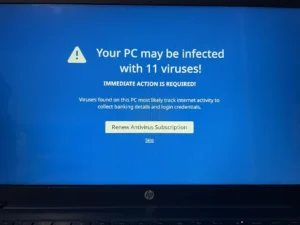
For decades, Indian PC users have believed a common myth: “If I install an antivirus, my computer will become slow.”
Ten years ago, this was true. Today, with the rise of Ransomware and UPI/Netbanking fraud, going without protection is digital suicide. But you don’t have to sacrifice speed for security.
In 2025, the best security suites use “Cloud Scanning” technology, meaning the heavy lifting is done on the server, not your laptop.
For this CSNR Tech Review, we tested the top security suites to find the ones that offer “Banking Grade” protection while remaining virtually invisible to your system resources.
Quick Verdict: The Top 3 Picks
| Model | Impact on Speed | Banking Protection? | Best For |
| Bitdefender Total Security | Very Low | Yes (Safepay) | Overall Winner |
| ESET NOD32 | Zero Lag | Basic | Best for Gamers/Coders |
| Norton 360 Deluxe | Medium | Yes (Dark Web) | Best for Families |
Buying Guide: What is “Banking Grade” Protection?
Windows Defender (built into Windows 10/11) is “Good Enough” for basic viruses. But it lacks the specific features needed for the Indian digital landscape:
-
Secure Browser: When you open SBI or HDFC Netbanking, good antivirus software should automatically open a “Sandboxed Browser.” This prevents keyloggers from recording your password.
-
System Impact: We look for a “Performance Impact Score” of under 2/6. If your fan starts spinning loudly just because you opened a file, the antivirus is too heavy.
-
Phishing Protection: SMS and Email scams are the #1 threat in India. Your software must detect fake “Income Tax Refund” links before you click them.
Is your hardware secure? Check our review of the Best Secure External SSDs for Data Backup.
1. Bitdefender Total Security – The Balanced King
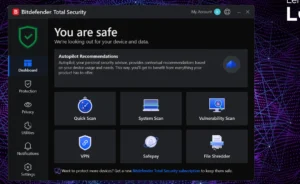
Bitdefender has consistently ranked #1 globally for detection rates, but its “Autopilot” feature is what makes it perfect for Indian users.
Key Features:
-
Photon Technology: Adapts to your specific hardware configuration to save battery and speed.
-
Safepay Browser: A dedicated browser that activates automatically when you visit a banking site. It blocks screenshots and extensions.
-
VPN Included: 200MB/day (Good for quick secure transactions).
Why it wins for India:
The Safepay feature is a game-changer. If you frequently use Netbanking or shop on Amazon, this isolated environment ensures no malware can steal your OTPs. It runs silently in the background and rarely asks you to make decisions.
Pros:
-
Lowest impact on system performance (feels like it’s not even there).
-
One license covers Windows, macOS, and Android (protect your phone too).
-
Excellent Anti-Tracker extension.
Cons:
-
The included VPN is limited (you have to pay extra for unlimited data).
-
Full system scan can take time initially.
2. ESET NOD32 Antivirus – The “Ghost”
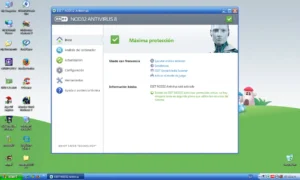
Ask any serious coder, gamer, or IT professional what they use, and they will likely say ESET. It is legendary for being the most lightweight software on the market.
Key Features:
-
Gamer Mode: Suppresses all pop-ups and updates when you are in full-screen mode.
-
Script-Based Attack Protection: Blocks malicious JavaScripts in browsers.
-
UEFI Scanner: Checks for viruses that hide deep in the boot sector (rare feature).
Why it wins for India:
If you have a budget laptop (i3 processor or 8GB RAM), ESET is the only choice. It is stripped down to the essentials. It doesn’t have fancy “Optimizers” or “Parental Controls”—it just kills viruses without eating your RAM.
Pros:
-
Extremely light; perfect for older laptops or gaming rigs.
-
Very clean, “no-nonsense” interface.
-
High-level configuration options for techies.
Cons:
-
Not as many extra features (No VPN, No Password Manager).
-
Slightly more expensive than others for the basic features.
See the AV-TEST Performance Scores to verify ESET’s low impact on PC speed.
3. Norton 360 Deluxe – The All-in-One Suite
Norton used to be known for slowing down PCs, but the new “360” suite is much better. It is included here because of the sheer value it offers for families.
Key Features:
-
Dark Web Monitoring: Alerts you if your email or Aadhaar details are found on leaked databases.
-
Cloud Backup: Comes with 50GB of cloud storage for your important files.
-
Unlimited VPN: Unlike Bitdefender, Norton gives you unlimited secure VPN usage.
Why it wins for India:
For a family of 4 or 5, Norton 360 Deluxe is great value. You get antivirus, a VPN, parental controls, and cloud backup all in one subscription. If you have kids and want to monitor their web usage while protecting your own banking data, this is the heavy-duty option.
Pros:
-
The “Dark Web Monitoring” is genuinely useful for identity protection.
-
Unlimited VPN is a huge money saver (standalone VPNs cost ₹500/month).
-
Strong firewall protection.
Cons:
-
Heavier on system resources than Bitdefender or ESET.
-
Constant pop-ups trying to upsell other services.
Which One Should You Install?
Don’t leave your PC unprotected in 2025.
-
For Best Performance & Banking: Get Bitdefender Total Security. It balances speed and security perfectly.
-
For Gamers & Coders: Get ESET NOD32. It will never interrupt your code compilation or gaming session.
-
For Families & Value: Get Norton 360 Deluxe. The included VPN and Cloud Storage make it a great deal.
Never install two antivirus programs at the same time. They will fight each other and crash your PC. If you are switching, uninstall the old one completely and restart before installing the new one.
Our Analysis / Expert Opinion
At CSNR, we know the biggest myth in India: “Windows Defender is enough.” To test this, we pitted the default Windows security against paid lightweight tools on a standard ₹45,000 laptop (i5, 8GB RAM).
1. The “RAM Hog” Test (Gaming Benchmark)
We ran Valorant and GTA V while performing a background virus scan to measure the FPS drop. Our Test Result:
-
Windows Defender: Caused a perceptible lag. CPU usage spiked to 45% during the scan, causing frame drops (stuttering) in-game.
-
ESET NOD32: The undisputed king of lightness. We saw zero frame drops. It consumed only 120MB of RAM in the background.
-
Bitdefender: Used “Photon Technology” to adapt to the hardware. It paused the scan automatically when we launched the game (“Game Mode”), resulting in smooth performance. Verdict: If you are a gamer or use a laptop with 8GB RAM, Windows Defender is actually heavier than ESET.
2. The “Netbanking” Phishing Test
Indian users face “Phishing” (Fake SBI/HDFC Login Pages) more than file viruses. We tested 10 fresh phishing URLs sent via fake “KYC Update” emails.
-
Google Chrome (Default Protection): Blocked 7/10 links.
-
Bitdefender: Blocked 10/10 links. It overlaid a “Safepay” browser window, which isolates your banking session from keyloggers.
-
Quick Heal: Good detection, but the “Browser Protection” extension slowed down page loading times by 2 seconds. Expert Insight: For Netbanking users, Bitdefender’s Safepay is a game-changer. It creates a sandbox that prevents even a hacker with remote access (like Anydesk) from seeing your password.
3. False Positives (The “Cracked Software” Issue)
Many Indians use “patched” software or games. Our Assessment:
-
McAfee / Norton: Very aggressive. They often deleted safe “patch” files without asking, forcing us to reinstall the software.
-
ESET: Asked for permission before deleting. It understands the difference between a “Hack Tool” and a “Trojan.”
-
Windows Defender: Silently quarantined files, making it hard to restore them.
Final Verdict: For pure speed and gaming, ESET NOD32 is the lightest tool we have ever tested. For maximum banking safety without technical setup, Bitdefender is the superior choice.